
50+ Very Useful OS X Tips
February 19, 2009
TechRadar.com offers a nice collection of OS X tips under 3 categories:
- Timesavers for everyday Mac use
- Save time working with photos, music and movies
- Save time doing common tasks on your mac
TypeDNA – a new Font Manager with ‘Magic’ Features
January 20, 2009
TypeDNA is a robust, standalone PC & MAC compatible Font Manager and plug-in set that seamlessly integrates with all of the most common host applications including Adobe Photoshop, Illustrator, InDesign, and Microsoft Office. Once integrated, TypeDNA significantly enhances your application’s font capabilities. For example, anyone can integrate TypeDNA with Adobe Photoshop to access a unique algorithm set that analyzes, matches and mixes similar font features. Combined, these grant anyone the power to FIND / SORT / CHOOSE / COMBINE and MANAGE fonts quickly and easily without having to understand formal typography rules.
For the TypeDNA website, go here. To learn more about its ‘magic’ features, go here.
13 Free Web Apps for Designers
January 20, 2009
The folks at Smashing Apps are constantly coming up with links to worthy tools and programs that will help make your working and design life easier. Follow the link below to their latest selection of free web-based apps.
I especially like TinEye, a reverse image search engine. You submit an image to TinEye to find out where it came from, how it is being used, if modified versions of the image exist, or to find higher resolution versions. And also Spending Diary, which offers a simple way to track and analyse your spending.
Flashback to Feb. 1984: John C. Dvorak disses that “new fangled device” the computer mouse
January 13, 2009
In January, 1984 the first commercially successful personal computer to feature a mouse and a graphical user interface rather than a command line interface was introduced, Apple Computer’s Macintosh.
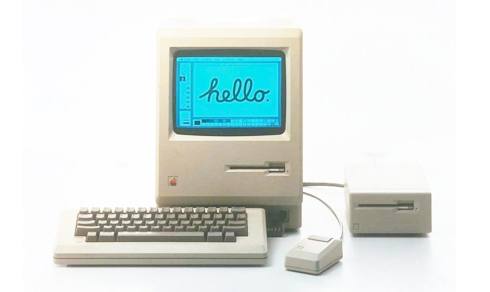
Of course, the best and the brightest of the day’s tech writers immediately saw it for the game changer it was and heralded it as the next great advance in computer technology. Or did they?
“The Macintosh uses an experimental pointing device called a ‘mouse’. There is no evidence that people want to use these things. I don’t want one of these new fangled devices.”
— the ever-prescient John C. Dvorak in the San Francisco Examiner
Or how about David Bunnell from The Macintosh Reader: “To hold up the Macintosh experience as an example of how to create a great product, launch an industry, or spark a revolution is a cruel joke.”
For more jollies about ‘Job’s folly’ follow the link below:
Jan. 1984: How critics reviewed the Mac – Apple 2.0.
FREE High-Resolution Grungy Paper Textures from Six Revisions
January 13, 2009
Six Revisions has a selection of excellent free high-res grungy paper textures available for download for the price we love best — FREE. Here’s a low-res sample, the link follows below.
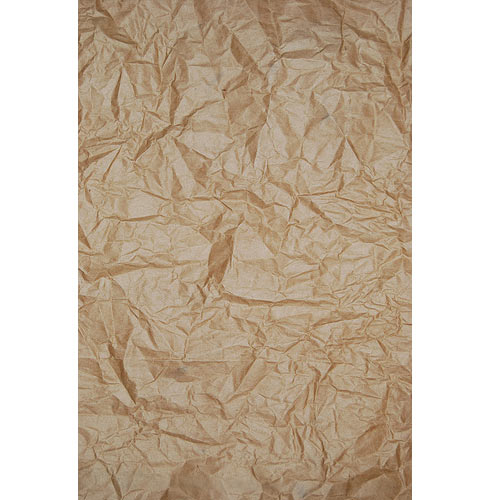
High-Resolution Grungy Paper Textures – Six Revisions
ImageFuser: Combine Multiple (Bracketed) Exposures
January 5, 2009
ImageFuser is a graphical front end for the Open Source Enfuse software available from Panotools. Mac downloads here, Windows downloads, here. See the panoramic example below:
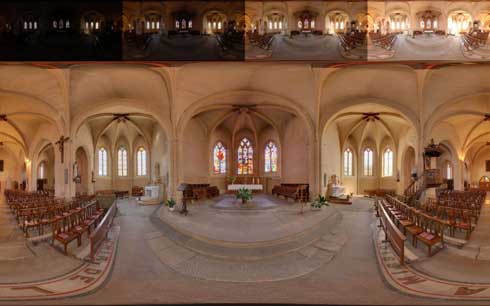
Enfuse is a command-line program used to merge multiple exposures (bracketed exposures) of the same scene and merges them together to form a uniformly lit scene.
It produces an image that looks very much like a tone-mapped image (without the halos). But it does not require the creation of an HDR (High Dynamic Range) image, so it’s much simpler to use and allows the creation of very large multiple exposure panoramas.
ImageFuser is a GUI for these Open Source tools:
- Enfuse http://enblend.sourceforge.net,
- Align_Image_Stack http://hugin.sourceforge.net and
- ExifTools http://www.sno.phy.queensu.ca/~phil/exiftool
AG Design site has some kick-ass tutorials
January 5, 2009
Check out the excellent design tutorials on the AG Design site, here.
Free Public Domain Images from your pal, the Government
January 5, 2009
Thanks to the great guys at Design Tools Monthly for this wonderful list of free image resources that you’ve already paid for with your tax dollars. Save the money you’d normally spend on quality pictures for your design projects and spend it on non-essentials like food, gas and shelter in 2009.
http://phil/cdc.gov/Phil/home.asp
www.loc.gov/rr/print/catalog.html
www.defenselink.mil/multimedia/multimedia.aspx
www.nps.gov/pub_aff/imagebase.html
www.photolibrary.fema.gov/photolibrary
www.nih.gov/about/nihphotos.htm
3 Great Sites for FREE PS Brushes, Textures & Tutorials
October 22, 2008
From the wonderful editors behind Design Tools Monthly, the Executive Summary of Graphic Design news come these three sites with great free stuff for Photoshop; brushes, textures and tutorials.
60 Free Textures Available from Stock.xchng
October 5, 2008
There are 60 high quality textures available for free from Stock.xcng. All you need to do is sign up for an account, also free. These include wood, grass, sand, canvas. leather, metal, satin & silk, wall, ink and several others. Certainly worth the price, these are also royalty free images. Access them through the Design Mag site.